
How to find which template file you using on specific page:
Hide some fields or specific code for specific user type?
You can use this to hide some fields it on frontend only:
http://iwinter.com.hr/support/?p=148
Or with custom php code like this you can hide any part of code for specific user type:
<?php if($this->session->userdata('type')=='ADMIN'): ?>
//This will be visible only for admin
<?php endif; ?>

Currency conversion widget

Can be purchased on codecanyon: http://codecanyon.net/item/real-estate-currency-conversion-widget/13456902
Widget is compatible with script version >=1.5.6
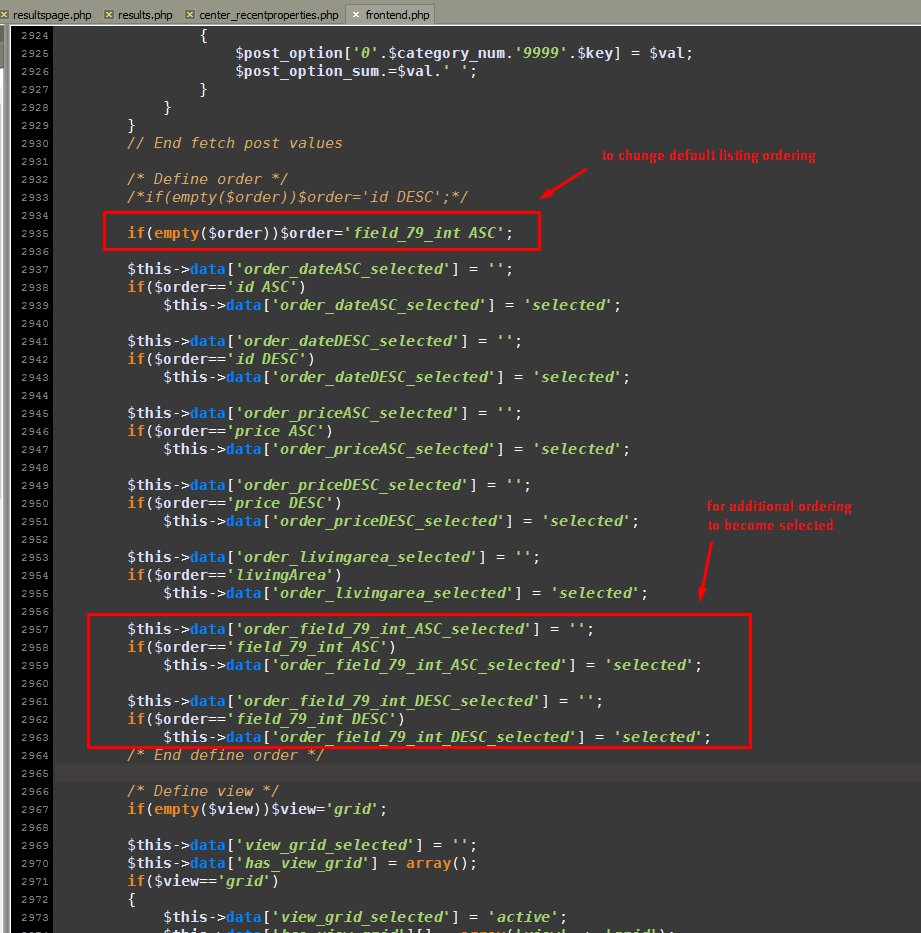
Add additional sort / order on homepage
Some PHP + HTML knowledge is required for this.
For version >= 1.5.5.:
This feature is only available for this type of fields: ‘INPUTBOX’, ‘DECIMAL’, ‘INTEGER’
For example that you want to enable filtering by: “Energy efficient”
Go to Admin->Real estates->Fields->Edit “Energy efficient” and click on “Enable numerical filtering”:

Now you need to add additional field in dropdown on homepage.
For realocation template for example open templates\{your-template}\widgets\center_recentproperties.php (or another if you using) add additional option in:
<select class="form-control pull-right selectpicker-small" placeholder="<?php _l('Sort'); ?>">
    <option value="id ASC" <?php _che($order_dateASC_selected); ?>><?php _l('DateASC'); ?></option>
    <option value="id DESC" <?php _che($order_dateDESC_selected); ?>><?php _l('DateDESC'); ?></option>
    <option value="price ASC" <?php _che($order_priceASC_selected); ?>><?php _l('PriceASC'); ?></option>
    <option value="price DESC" <?php _che($order_priceDESC_selected); ?>><?php _l('PriceDESC'); ?></option>
</select>
For example:
<option value="field_59_int ASC" <?php _che($order_field_59_int_ASC_selected); ?>><?php _l('Energy efficient'); ?></option>
Also you should add it in: templates\{your-template}\results.php
if value is not numeric then you should:
into property_lang database table add:
varchar(200)utf8_
varchar(200)utf8_
Add this:
<option value=”field_7 ASC”>Your option name</option>
7 in that case represents field ID
One example:

Backup issue in script
You receive message: Unsupported feature of the database platform you are using.
You can try with another driver, edit file: application/config/production/database.php
in line:
$db['mysql']['dbdriver'] = 'mysqli';
In this case for example change from mysqli to mysql
Also it’s safer if you backup via cpanel, so just backup there:
http://iwinter.com.hr/support/?p=3144
Stackoverflow link about this issue:
How to hide options / design customization button?
This button is only visible when admin is logged in or if system is installed as demo, so you should only logout or change system type to cms on installation.
Can’t create table issue on installation
If you receive message like:
Can’t create table ‘mydatabase.ads’ (errno: -1)
Probably your mysql server don’t have innoDB storage engine enabled. You can check this, add some table and try to set innodb engine:

If this is your situation, please ask your hosting provider why innodb storage engine doesn’t work on your mysql server.
Currency format in frontend / backend
By default this is not supported.
There is one feature in beta. in application\config\cms_config.php you can add:
$config['enable_numeric_input'] = TRUE;
Then you can change field type for Sale to: INTEGER INPUT
After that number will be formated in this format: 12,345,678
Sending email issues
Sending email doesn’t work on localhost, only on real server.
If your server support mail function, you don’t need any special configuration.
If your server doesn’t support mail function then you can use external smtp, details for configuration: http://iwinter.com.hr/support/?p=228
You need to change no-reply email address in admin->settings->system settings to real existing email address or mails can be blocked.
You can also try this basic php sendmail example to see if your “mail” function on server works properly: test_mail.zip
On some very specific server configuration “-f” flag can cause issues when using mail function. In this case you can open: system\libraries\Email.php , line around 1537:
if ($this->_safe_mode == TRUE)
Change it to:
if ($this->_safe_mode == TRUE || TRUE)
And save changes
Additional strange situation possible in system\libraries\Email.php:

If this doesn’t work then ask your hosting provider why email sending feature doesn’t work on this server and send link to example basic php sendmail example code.
Alternative Solution for SMTP if regular codeigniter method doesn’t work:
First you should have it configured for smtp, guides: http://iwinter.com.hr/support/?p=228
Download smtptester and extract to your server root directory near index.php
paste it like that:

And configure regular email config to send with smtp as described here: http://iwinter.com.hr/support/?p=228
SMTP config in new script versions (from 25.7.2021):
How to reset property views / counter to 0
You can run this query on database:
UPDATE `property` SET `counter_views`=0
Upload file / photo issue
Few possible issues:
First check if you have space available on server.
Check if your PHP version is >= 5.6, if not, then update to 5.6
Check chmod file writing permissions:
http://iwinter.com.hr/support/?p=152
mod_security issue looks like this:

If you receive error every time, then check if GD library is installed on your server
If you receive error on large images / bigger filesize, check this parameters on your server php.ini, should be:
max_execution_time = 300
memory_limit = 256M
post_max_size = 128M
upload_max_filesize = 128M
Most shared servers support php.ini configuration when you copy htaccess_examples\php.ini into your www directory so place where is index.php file
If this doesn’t work then check with your hosting provider or use this one:

Upload settings in script:
You can also customize some upload settings in script file
application\libraries\
for example search for:
‘max_file_size’ => null,
If you receiving aborted message
Very rarely (1 server on 1000) have trouble with some filesize issues, send file is not same as uploaded, this indicate some issue in server configuration or other mechanism.
This can be used as hack, but better option will be to use our suggested hosting provider:

Related to image orientation problems (can be caused by some cameras strange/wrong EXIF data), try this solution:

Issues on upload logo or similar, we noticed:

in .htaccess add:
<IfModule mod_security.c>
  SecFilterEngine Off
  SecFilterScanPOST Off
</IfModule>
and set permisson 0777
You need very custom number formating?
You can enable beta feature numeric field in cms_config.php:
$config['enable_numeric_input'] = TRUE;
After that you can change field type in admin->real estate->fields->price related fields.
If you have issue with results ordering:
Please check application\models\estate_m.php, line around 592 you can find:
$value_n = str_replace("'", '', $value_n);
$value_n = str_replace("’", '', $value_n);
$value_n = str_replace(",", '', $value_n);
You can customize this code by your needs.
Example for format: #.###,00
$value_n = str_replace("'", '', $value_n);
$value_n = str_replace("’", '', $value_n);
$value_n = str_replace(".", '', $value_n); // to remove dot
$value_n = str_replace(",", '.', $value_n); // to replace , with dot
After that you should edit->save your available properties.
Regarding filters on search form:
Regarding this filters, you cahn change functionality in:
templates\bootstrap2-responsive\components\head.php, search for:
/* [START] NumericFields */

$(function() {
    <?php if(config_db_item('swiss_number_format') == TRUE): ?>

    $('input.DECIMAL').number( true, 2, '.', '\'' );
    $('input.INTEGER').number( true, 0, '.', '\'' );

    <?php else: ?>

    $('input.DECIMAL').number( true, 2 );
    $('input.INTEGER').number( true, 0 );

    <?php endif; ?>
});

/* [END] NumericFields */
Swiss number formating
You can enable swiss number formating in cms_config.php, add:
$config['swiss_number_format'] = TRUE;
And customize example code by your wish.
You can also customize number formatting in jquery plugin code:
/ templates / bootstrap2-responsive / assets / js / jquery.number.js
Change line 139 and 140 to define the point and the comma
Link to jquery plugin which is used:
How to use newsletter?
You can export user emails to use in newsletter apps like mailchamp.

If you want newsletter signup form, please check this:
http://kb.mailchimp.com/lists/signup-forms/add-a-signup-form-to-your-website
You can paste Embedded form into for example:
templates\{your-template}\page_homepage-filters.php

How to change default listing order / sort on homepage?
In file application\controllers\frontend.php in index method, line around 3219 or use search function in your editor to find it.
Change from:
if(empty($order))$order='id DESC';
to for example:
if(empty($order))$order='price ASC';

Real Estate Theme #02

Theme is compatible with version >=1.5.4
Description and purchase details are available on this link:
http://codecanyon.net/item/property-listing-and-hotel-booking-portal-02/12624450
How to change rectangle start size?
You can customize size of rectangle in templates\bootstrap2-responsive\components\head.php, search for:
new google.maps.LatLng(map_center.lat()+0.4, map_center.lng()+0.8)
And change values to wanted.
Cpanel installation guide
Of course first you should buy hosting package for your website, my suggestion where everything is tested and works nice:

If you are too lazy or don’t have time I can also provide you installation service, details:
https://iwinter.com.hr/support/?page_id=1870
1. Login to your cpanel and click on mysql databases icon:

2. Create database:

3. Create user:
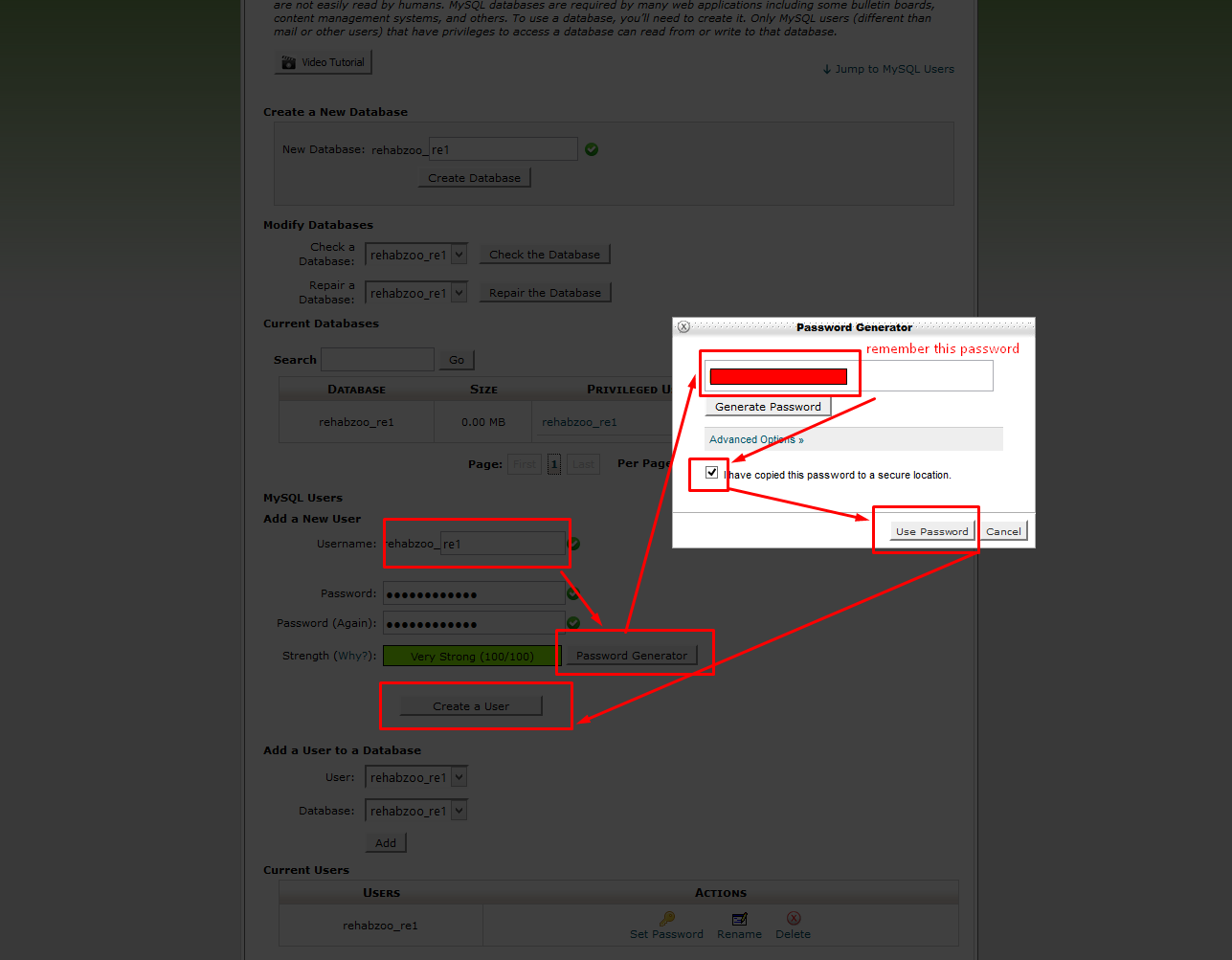
4. Add user to database:

5. Define user privileges:

6. Go to phpMyAdmin:

7. Change char set:

8. Open file manager:

9. Go to file uploading:

10. Upload file:

11. Extract file on server

12. Delete file from server:

13. Now you are ready to install script:

14. Save provided details and open your website:


Mortgage Loan calculator

Module is compatible with version >=1.5.4
Description and purchase details are available on this link:
http://codecanyon.net/item/real-estate-mortgage-loan-calculator-/12313795

Extra SEO module
Extra SEO module can replace:
http://website.com/property/31/en/property_title with:
http://website.com/my-custom-slug.htm
Module is compatible with version >=1.5.3
This module is very server configuration
sensitive so no guarantee that will work on all servers.
But it is tested on https://www.a2hosting.com/refer/59624 and there works fine.
Price: 30 EUR + VAT (if applicable)
If you are interested for this module please send me message to email: sanljiljan@geniuscript.com

Booking module
This module enable day bookings, reservations, earning money as fee, withdrawal money for owners/agents, availability calendar for properties.
Usage example, tutorial and screenshots: Booking instructions
Price: 30 EUR + VAT (if applicable)
If you are interested for this module please send me message to email: sanljiljan@geniuscript.com