Google Maps API error on Portal

Quick solution:

  1. Update script to latest version v1.5.9
  2. Get you Maps API key from Google: JavascriptAPIKEy
  3. In Admin->Settings->System settings enter your “Google Maps API key”

Description and changes in older script versions:

From 22 June 2016,  Google blocking GoogleMaps libraries all new domains and some old.

Usage limits description: https://developers.google.com/maps/documentation/javascript/usage

Continue reading

Open search results on another page?

Something like this is not supported and additional coding is required.

If you are not familiar with coding, please follow this guide: http://iwinter.com.hr/support/?page_id=1870

Customization hints for your developer:

Script version >= 1.5.9:

In your cms_config.php add:

$config['search_listing_page'] = 2;

where number 2 represents page ID where you wish to show results. Of course this page should have template which showing results or it not be visible.

For older script versions:

templates\{your-template}\widgets\head.php, customize javascript function manualSearch, it is triggered when user click “search” button and contains all parameters.

You should develop redirect to another page, with search json for api, details: http://real-estate.iwinter.com.hr/documentation/#!/public_api_rss

Example:

example-redirect


ssl, https configuration

In script version >=v1.5.9 this feature should work by default or after entering your url in:

application\config\config.php

In script version <1.5.9:

In templates\bootstrap2-responsive\widgets\head.php replace http://maps.google.com with https://maps.google.com for frontend.

Same thing in: application\views\admin\components\page_head_main.php same thing.

In application\config\config.php , enter base_url with https:// prefix

If you want auto redirect this can be done by server configuration, please ask hosting provider or find option in your hosting admin interface.

For Hotel Booking / realocation:

File: templates\realocation\widgets\custom_javascript.php replace http://maps.google.com with https://maps.google.com for frontend.

PHP 7 compatibility

Our testing is based on PHP 7.0.4 With XAMP portable lite 7.0.4
Download link: https://sourceforge.net/projects/xampp/files/XAMPP%20Windows/7.0.4/

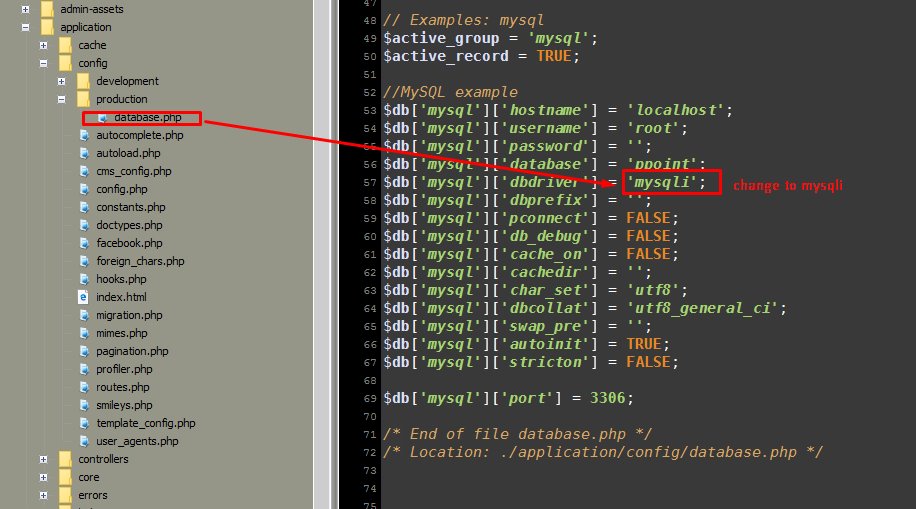
PHP 7 doesn’t support standard mysql connection like mysql_connect, only via PDO or mysqli.

Our script support mysqli perfectly, so If you want to install script to PHP7, you need to define mysqli in database configuration:

Screenshot_3

Also when configurator is executed you should select mysqli as database connection:

Screenshot_4


Other is same as with default installation.

Some PHP notices/warnings are still possible in developer script mode, if you using xampp you can disable developer mode by instructions:

Screenshot_1

codecanyon_icon

iPhone / iOS App for Real Estate

banner

Native Swift iOS App template compatible with our Real Estate solutions.

If you are interested please send me email to: sanljiljan@geniuscript.com
With subject {ios-app}

Demo App example: iTunes link

Developer license price: 50 EUR + VAT, for 1 app on iOS market (publish app service or modifications are not included, source code is included)

If you are interested for this module please send me message to email: sanljiljan@geniuscript.com

Continue reading

Visual search form builder tricks

If you using template which support visual search form builder like:

Property Listing and Hotel Booking Portal #02
Real Estate Retro Template #03
Horse Market Sell & Rent Portal

You can customize forms by guide:

http://geniuscript.com/wbooking/user_guide_theme/#!/custom_search_form

But if you wish for example split row into 3 columns or add custom css class then you can add it also:

split_example

then depend on bootstrap version or custom classes you can add for example “bootstrap3″:

Screenshot_1

More detail about bootstrap grid system:

http://www.w3schools.com/bootstrap/bootstrap_grid_examples.asp