Category Archives: Real estate agency portal

Configurator page appears after change cms_config.php

This happens when you upload fresh cms_config.php, and by instructions you should edit file on server not upload fresh/new one from not installed script.

Looks like you overwritten your application\config\cms_config.php with new file.

If you have old, then restore and upload old.

If not then you can open it and change:

$config['installed'] = false;

to

$config['installed'] = true;

If you also overwritten database configuration, then populate it again in application\config\production\database.php

nginx 502 and related issues

Looks like nginx and codeigniter session library are not compatible because nginx have some limitation on session so issues are possible.

Most simple solution is to ask hosting provider to disable nginx or just get another hosting, tested on:

a2_hosting_logo

Another is to disable nginx on server if you have such privileges, some solution:

http://askubuntu.com/questions/470737/how-to-remove-nginx-and-re-activate-apache

or you can try also this:
Increase the proxy buffer sizes in  nginx.conf file. For instance:

fastcgi_buffers         16  16k;
fastcgi_buffer_size         32k;

proxy_buffer_size 128k;
proxy_buffers 4 256k;
proxy_busy_buffers_size 256k;

If you can’t figure this out you can send me for test your
FTP login details:
Website link:
Admin login details:
Use case scenario:
To sanljiljan@geniuscript.com

Not allowed characters issue

Probably you have some strange characters in URL/URI, in most cases this issue occurs on customization’s.

Can be issue with non-ascii character in currency code if you customized this part of script.

In application\config\config.php you can add additional allowed characters in:

$config['permitted_uri_chars']
icon

Real Estate Trulia addon

banner

This module will generate XML which will give you opportunity to auto submit properties from your portal on Trulia.

To auto submit listings please follow “Trulia XML” Instructions:

http://www.trulia.com/submit_listings/feed/

Module supports all required fields by trulia documentation, first image, some important fields and few amenities data submission, but not all available fields in our script

Module is compatible with script version >=1.5.6

If you are interested for this module please send me message to email: sanljiljan@geniuscript.com

Add additional sort / order on homepage

Some PHP + HTML knowledge is required for this.

For version >= 1.5.5.:

This feature is only available for this type of fields: ‘INPUTBOX’, ‘DECIMAL’, ‘INTEGER’

For example that you want to enable filtering by: “Energy efficient”

Go to Admin->Real estates->Fields->Edit “Energy efficient” and click on “Enable numerical filtering”:

numeric_filtering

Now you need to add additional field in dropdown on homepage.

For realocation template for example open templates\{your-template}\widgets\center_recentproperties.php (or another if you using) add additional option in:

<select class="form-control pull-right selectpicker-small" placeholder="<?php _l('Sort'); ?>">
    <option value="id ASC" <?php _che($order_dateASC_selected); ?>><?php _l('DateASC'); ?></option>
    <option value="id DESC" <?php _che($order_dateDESC_selected); ?>><?php _l('DateDESC'); ?></option>
    <option value="price ASC" <?php _che($order_priceASC_selected); ?>><?php _l('PriceASC'); ?></option>
    <option value="price DESC" <?php _che($order_priceDESC_selected); ?>><?php _l('PriceDESC'); ?></option>
</select>

For example:

<option value="field_59_int ASC" <?php _che($order_field_59_int_ASC_selected); ?>><?php _l('Energy efficient'); ?></option>

Also you should add it in: templates\{your-template}\results.php

if value is not numeric then you should:

into property_lang database table add:

varchar(200)utf8_unicode_ci

Add this:

<option value=”field_7 ASC”>Your option name</option>

7 in that case represents field ID

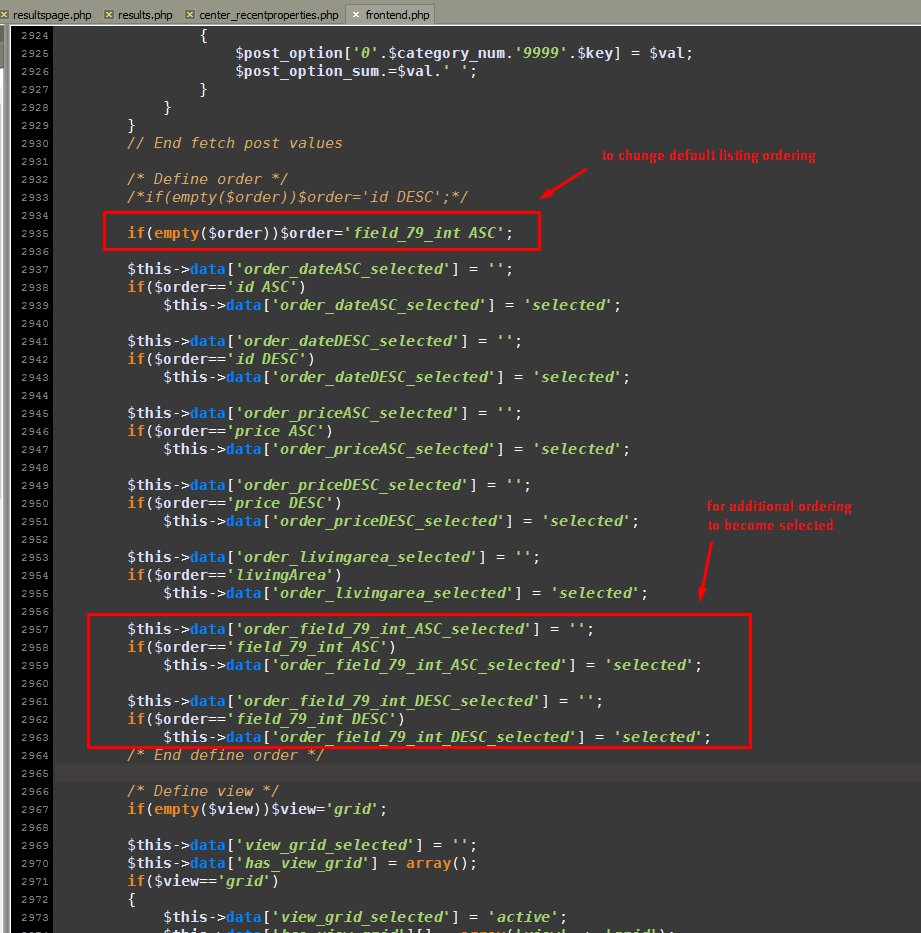
One example:

ordering_default

ordering_example_selection


Backup issue in script

You receive message: Unsupported feature of the database platform you are using.

You can try with another driver, edit file: application/config/production/database.php

in line:

$db['mysql']['dbdriver'] = 'mysqli';

In this case for example change from mysqli to mysql

Also it’s safer if you backup via cpanel, so just backup there:

http://iwinter.com.hr/support/?p=3144

Stackoverflow link about this issue:

http://stackoverflow.com/questions/24197844/database-utility-backups-not-working-with-mysqli-codeignitor