In file templates\bootstrap2-responsive\components\head.php, line around 168 you can found (or just use CTRL+F to find it) and change:
var mapDisableAutoPan = false;
to:
var mapDisableAutoPan = true;

In file templates\bootstrap2-responsive\components\head.php, line around 168 you can found (or just use CTRL+F to find it) and change:
var mapDisableAutoPan = false;
to:
var mapDisableAutoPan = true;
For example if you want to hide rooms for Land type of property type, you can do this very easy with depended fields:
Admin->real estates->depended fields->Add->Select property type “Land”, check wanted fields like rooms and save
In: templates\bootstrap2-responsive\config\template_config.php
$config['per_page'] = 8;
For agents pagination:
$config['per_page_agents'] = 6;
In application\config\cms_config.php you can change above code.
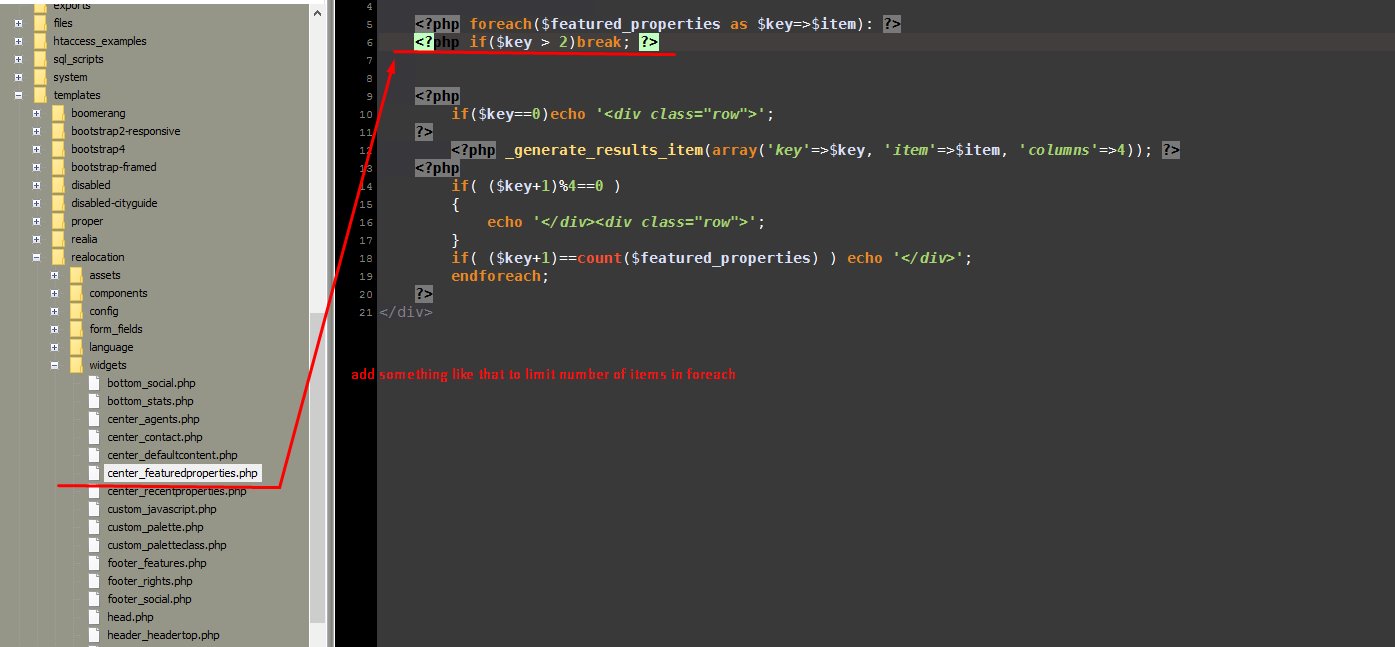
This will only limit results, so other will be hidden.
$config['email_activation_enabled'] = TRUE;
$config['email_activation_enabled'] = TRUE;
in application\config\cms_config you can add:
$config['disable_faq_for_agent'] = TRUE;
In version >=1.5.4:
Admin->Pages->Edit->change header template
In versions <=1.5.3:
Can be done with wanted template file customizations, just remove part of code that showing map/slider/search, for example on classic page_page.php located in folder: templates\bootstrap2-responsive, remove this part:
<input id="pac-input" class="controls" type="text" placeholder="{lang_Search}" />
<div class="wrap-map" id="wrap-map">
</div>

{template_search}
Auto-backup via cpanel:
1. Login to your cpanel
2. Backups->Download a Full website backup
Manual-backup via cpanel or similar tool:
1. Login to your cpanel
2. (Backup database) Go to phpMyAdmin, select database, export:

3. (Backup files) Go to file manager from cpanel dashboard:

Select folder where script is installed, all files inside and archive

Download compressed file:
In application\config\cms_config.php add:
$config['walkscore_enabled'] = TRUE;
Also don’t forget to check out this even better solution:
So you want to add/remove something in some HTML template? You are on right place 
Of course, CSS / HTML knowledge is required for something like that. If you don’t know what is CSS/HTML then please check out my services: http://iwinter.com.hr/support/?page_id=1870
Import is a big problem, because all systems are different, don’t support same fields/parameters/languages, database structure is different, export formats also. So there is no universal solution for this. I will try to help you with building import bridge script here. (SQL/PHP/XML/CodeIgniter Skills are required).
Lets say that you already have your data in some PHP array or object (this fully depends on your custom data).
Now you want create bridge script that will import this data into real estate script database.
Please read this article for more info: http://tools.seobook.com/robots-txt/
Open file: templates\bootstrap2-responsive\widgets\head.php
Open file: templates\bootstrap2-responsive\components\head.php
Search for: var scrollWheelEnabled = false;
change to true
Open phpMyAdmin, select your database and run this query:
UPDATE `option` SET `parent_id`=0 WHERE `id`=64

View file is application\views\admin\estate\edit.php, you should detect lines based on option type. For example if you changing for TEXTAREA (long input) then line 162…
You can for example add class hide into:
<div class=”form-group”>
So replace it with omething like that:
<?php if($this->session->userdata('username') != 'sandi' && $val_option->id == 73): ?>
<div class="form-group hide">
<?php else: ?>
<div class="form-group">
<?php endif; ?>
In this case only user with username sandi will see option 74 field when edit property in administration…
Pseudo variables in standard codeigniter template variables: http://www.codeigniter.com/user_guide/libraries/parser.html
This is instructions:
{last_estates}
{/last_estates}
Should be changed to this:
<?php foreach($last_estates as $item): ?>
<?php endforeach(); ?>
And variables inside like:
{thumbnail_url}
Should be changed to:
<?php echo $item['thumbnail_url']; ?>
This for example:
{has_option_36}
{/has_option_36}
to:
<?php if(empty($item['option_36'])): ?>
<?php endif; ?>
To be hanest, I will change all pseudo variables in future to real PHP variables because cause only problems when somebody like you want to customize something, format something differently etc…
Check out following screen for place where you can customize:
This is currently possible with customization only, but something like that is also on todo list so will be available in future.
For frontend property submission customization can be added to:
templates\bootstrap2-responsive\editproperty.php, lines around 380.
Most simple example can be found here:
http://www.w3schools.com/tags/att_input_required.asp
Andif you want for specific ID, then you can use something like this:
<?php echo ($val_option['id']==5)?'required':''; ?>