Open phpMyAdmin, select your database and run this query:
UPDATE `option` SET `parent_id`=0 WHERE `id`=64


Issues related to Real estate agency portal
Open phpMyAdmin, select your database and run this query:
UPDATE `option` SET `parent_id`=0 WHERE `id`=64
if you have problem with hostname, in standard hosting providers this should be localhost, but sometimes not and depends on hosting provider. Please ask your hosting provider which MySQL database hostname and port you should use for database access.
You can also test your database details with this basic connection code to be sure that it’s right:
<?php
$servername = "localhost";
$username = "your-username";
$password = "your-password";
$database_name = "your-database-name";

$conn = new mysqli($servername, $username, $password, $database_name);
if ($conn->connect_error) {
die("Connection failed: " . $conn->connect_error);
}
echo "Connected successfully";
?>
Source: http://www.w3schools.com/php/php_mysql_connect.asp
If your database connection works and you still have issue with script connection then please provide me your cpanel login details, database details and website link for test, via email: sanljiljan@geniuscript.com
You probably make PHP syntax error, like attached image. Please check this out.

If this is not issue, then: http://iwinter.com.hr/support/?p=7003
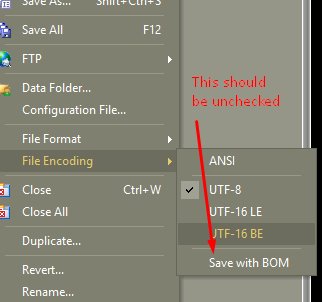
BOM also can cause this issue, you should save PHP files without BOM: https://en.wikipedia.org/wiki/Byte_order_mark
First you should buy another hosting package for your website, my suggestion where everything is tested and works nice:


Script using advanced hashing methods to protect passwords saved in database, if your server doesn’t support same as localhost, then login will not work on any account.
In that case you should register new account, and manually define it as admin to login as admin, for this you should:
Login to your Cpanel->PHPMyAdmin->Open database table users and change type of added user to ADMIN:

PDF file with screenshots: http://map-kiosk.com/codecanyon/translate_instructions.pdf
Admin->Settings->Languages->Translate files for wanted language->frontend_template_lang.php->translate missing fields
Example video: http://geniuscript.com/support-videos/change-text.mp4
If some words are missing, you can add it in file:
templates\{template_name}\language\english\frontend_template_lang.php
* {template_name} is your template, usually bootstrap2-responsive, realocation, …
Also can be translated manually via file:
templates\{template_name}\language\{wanted_language}\frontend_template_lang.php
Admin->Settings->Languages->Translate files->Translate min. all fields in backend_base_lang.php
*Hint: You can also use auto translation feature (button on top) using Google or MyMemory API
Also can be translated manually via file:
application\language\{wanted_language}\backend_base_lang.php
On admin login page, we don’t know which language to show, because of that it showing default defined in config file “english”, if you want to change this just change langauge in:
application\config\config.php
Looks like you didn’t translate pages to this language. Please change your language in profile to english, Logout->Login again, Edit all pages and translate to your language.
Looks like your server don’t give permission to PHP script for write/delete files on server. Solution is to chmod 755 in following files/folders:
/templates/{your-template}/assets/cache and all files inside
/files/thumbnail and all files inside
/files/captcha and all files inside
/files and all files inside
/application/config/cms_config.php
/application/config/production/database.php
/application/language and all files/folders inside
/system/language and all files/folders inside
/templates/bootstrap2-responsive/language and all files/folders inside
/templates/bootstrap2/language and all files/folders inside
/application/logs and all files/folders inside
/sitemap.xml
If doesn’t help, you can try with chmod 777
Go to your godaddy account file manager –> WebRoot directory –> Create php5.ini if it does not exist and place following line: cgi.fix_pathinfo = 1 and remove other lines if exists
Now you need to restart your Web Process: Log in to your Account Manager. Click Web Hosting. Next to the hosting account you want to use, click Manage. In the Stats & Monitors section, click System Processes.
In the list on the left, click the process you want to view or click All Processes to view all processes at once. To end a process, click the corresponding end button on the toolbar. Usual just click “End all”.
If you still have issue then configure specific settings in “application/config/config.php”, for me this works:
$config['base_url']    = 'http://example.com/';
$config['uri_protocol']    = 'PATH_INFO';
$config['index_page'] = 'index.php';
to
$config['index_page'] = 'index.php?';
$config['uri_protocol'] = 'AUTO';
to
$config['uri_protocol'] = 'QUERY_STRING';
CodeIgniter guide: https://github.com/EllisLab/CodeIgniter/wiki/Godaddy-Installation-Tips
Regarding hosting providers, my scripts are tested on:
And my suggestion if you decide to purchase by other hosting provider, please save your money/time and don’t buy from godaddy, goddady is good for domains but not for hosting because of many configuration limitations!
Please login to read this.
It will not automatically show in search tab (sometimes you don’t want to show all checkbox in search tab)…
You should add it to:
Please login to read this.
You can find clustering configuration in template file.
in case of template bootstrap2-responsive can be found in:
templates\bootstrap2-responsive\components\head.php, line around 110:
In latest script version file: templates\{your-template}\widgets\head.php
// Cluster config start //

clusterConfig = {

radius: 60,

// This style will be used for clusters with more than 2 markers

2: {

content: "<div class='cluster cluster-1'>CLUSTER_COUNT</div>",

width: 53,

height: 52

},

// This style will be used for clusters with more than 5 markers

5: {

content: "<div class='cluster cluster-1'>CLUSTER_COUNT</div>",

width: 53,

height: 52

},

// This style will be used for clusters with more than 20 markers

20: {

content: "<div class='cluster cluster-2'>CLUSTER_COUNT</div>",

width: 56,

height: 55

},

// This style will be used for clusters with more than 50 markers

50: {

content: "<div class='cluster cluster-3'>CLUSTER_COUNT</div>",

width: 66,

height: 65

},
Or in case of realocation:
templates\realocation\assets\js\map_custom.js
The problem is follow:
http://domain.com/domains/domain.com/index.php
I need to show it as:
What do I have to change? In wordpress is function static URL. Im sure I can change something in index.php, can you tell me what or cut you help me with this problem?
In file application\config\config.php change line around 29:
$config['base_url'] = '';
To
$config['base_url'] = 'http://domain.com/';
Error received:
An Error Was Encountered
The action you have requested is not allowed.
Please login to read this.
Captcha is supported after version 1.4.9.
Example is here: http://real-estate.iwinter.com.hr/index.php/property/14/en/black_glass_house
Please login to read this.